Check the page first
The Publish step shows your public page exactly as people will see it: the figures, the pay quarters and your statement, with the logo and colour you set in Settings.
If Settings asks for a second pair of eyes, someone other than the person who publishes reads the page and marks it checked first.
Publishing
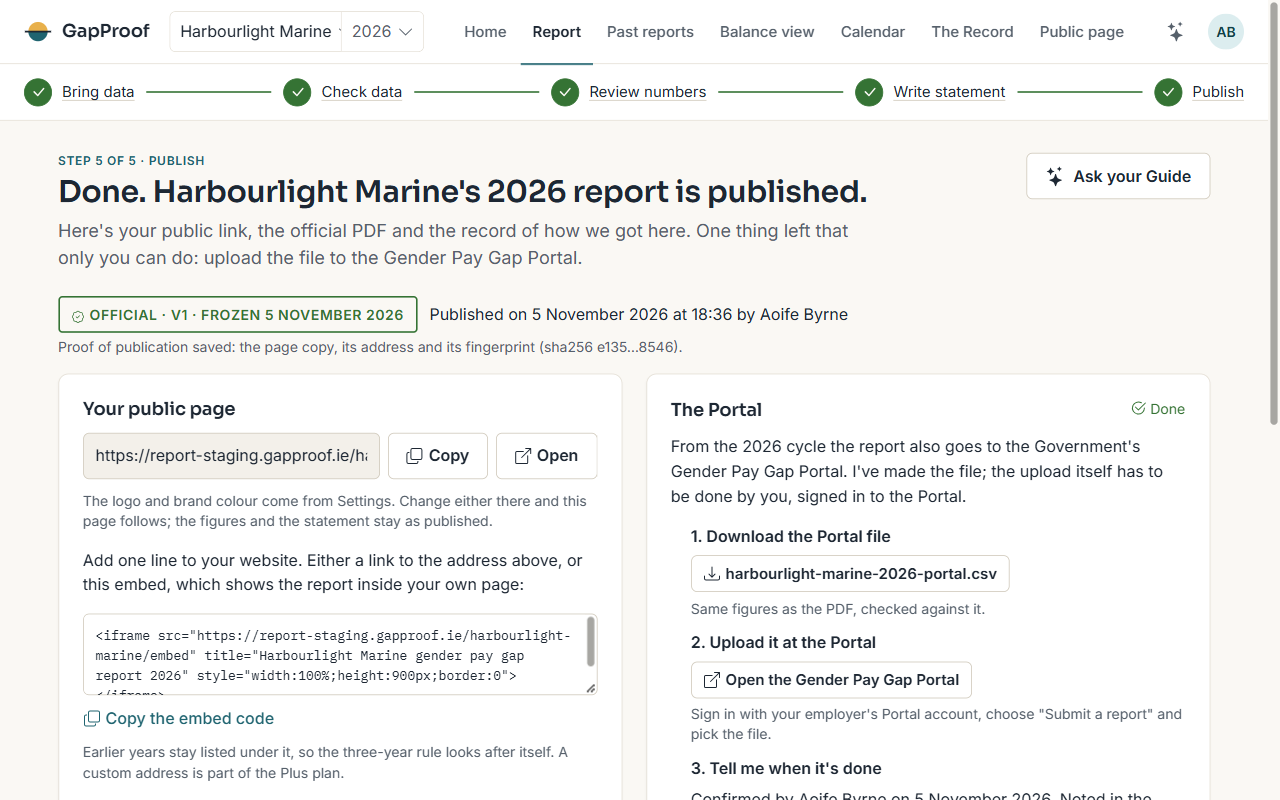
Publishing makes this version public at its address, produces the official statutory PDF with its verification code, and records the exact page, its address and its fingerprint as proof of publication. It's the second one-way step, and an owner's step.
A correction later makes a new version. The page then shows when it was updated, and keeps the earlier version available.
Adding it to your website
The law asks for the report to be on your own website. Add one line: a link to your public page, or the embed code from the Public page area, which shows the report inside your own page.
Uploading to the Government's Portal
From the 2026 cycle the report also goes to the Government's Gender Pay Gap Portal, by the same date. I make the file for you; the upload itself is done by you, signed in to the Portal with your employer's account.
- Download the Portal file from the Publish page.
- Sign in to the Portal, choose Submit a report and pick the file.
- Come back and confirm the upload. I note the date and your name in the Record.
How long it stays up
The page stays public for three years, as the law asks. The Calendar shows the date.